



Description
Download Youtube Downloader HD – YouTube video downloader, download YouTube videos, HD video, MP4, AVI, mobile app
Overview
Youtube Downloader HD is a mobile application designed to help users save YouTube videos directly to their devices for offline viewing. The app functions as a straightforward utility tool, enabling users to download videos in high definition, including HD and Full HD formats, depending on availability. It supports conversion to widely compatible formats such as MP4 and AVI, making it suitable for playback on various devices, including iPods and iPhones. The primary purpose of the app is to provide a convenient, no-frills method for preserving content from YouTube without relying on browser extensions or complex scripts.
Target users include individuals who frequently watch videos on YouTube but require offline access, such as travelers, students, or content creators. The app is particularly useful for those who want to archive tutorials, lectures, or entertainment content without an internet connection. While the developer, T2D Media, has not provided additional background information, the app’s focus on simplicity and format flexibility suggests a targeted approach to user convenience. In the broader app ecosystem, tools like this fill a niche for content accessibility, especially in regions with limited connectivity or data constraints.
Although the developer did not provide specific technical details about integration with YouTube’s API or data handling practices, the app operates independently of browser plugins, emphasizing direct functionality. Real-world use cases include saving educational videos for study sessions, downloading music videos for offline listening, or preserving personal favorites. The app’s free pricing model further enhances its accessibility, making it a viable option for users seeking basic video downloading capabilities.
Key Features & Functionality
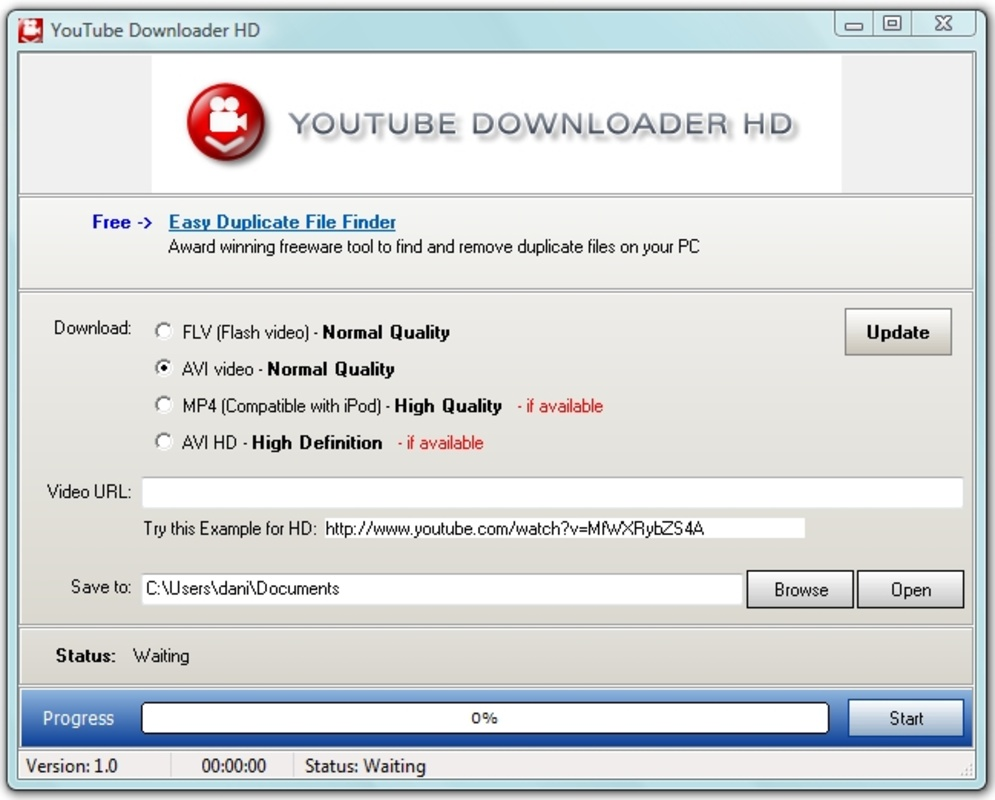
- YouTube Video Download – Users can copy a video URL from their browser and paste it into the app to initiate a download. This eliminates the need for browser extensions or scripts, streamlining the process.
- HD and Full HD Support – The app allows downloading videos in high definition, including HD and Full HD formats, where available. This ensures high-quality playback on compatible devices.
- Format Conversion – Downloaded videos can be converted to MP4 or AVI formats, improving compatibility with a wide range of media players and devices, including iPods and iPhones.
- Offline Access – Once downloaded, videos are stored locally, enabling users to view them without an internet connection, ideal for travel or areas with poor connectivity.
- Simple User Workflow – The app follows a minimalistic approach: copy URL → paste in app → download → convert (optional) → play locally.
For example, a student can copy a URL from a YouTube lecture, paste it into the app, and save the video in MP4 format for review during a commute. Similarly, a music enthusiast might download a Full HD concert video to enjoy on a device without streaming. The app’s focus on core functionality ensures that users are not overwhelmed by unnecessary features, maintaining a clear and efficient workflow. The absence of in-app purchases or ads, combined with a free price model, supports uninterrupted access to these features.
Interface, UX & Performance
The user interface of Youtube Downloader HD appears to be minimalistic and functional, prioritizing ease of use over visual flair. The layout likely centers around a single input field for pasting the YouTube URL, with clear buttons for initiating the download and managing saved videos. Navigation is expected to be straightforward, with minimal steps between copying a URL and starting the download process.
Visual style is not described in detail by the developer, but the app’s focus on utility suggests a clean, no-nonsense design. The absence of complex menus or layered options supports a smooth user experience, particularly for first-time users. Responsiveness is critical for a tool like this, and although the developer did not list formal performance metrics, the app’s lightweight size of 3.2 MB indicates optimized resource usage.
Performance on different device categories remains unspecified, but the app’s small footprint suggests compatibility with a wide range of Android devices, including older models. Stability is likely maintained through a focused feature set, reducing the risk of crashes or freezes. Users can expect consistent behavior when performing core tasks, such as URL pasting and file conversion. The app’s performance in handling large video files may vary depending on device storage and processing power, but no specific limitations were disclosed.
Platform Compatibility & Technical Requirements
Youtube Downloader HD is available exclusively on the Android platform. The current version is 1.2.5, and the app has a file size of 3.2 MB, making it a lightweight download suitable for devices with limited storage. The developer did not specify minimum OS requirements, so compatibility with older Android versions cannot be confirmed. Users should ensure their device runs a supported version of Android to avoid installation issues.
Given the app’s size and focus on basic functionality, it is likely compatible with a broad range of Android devices, including mid-tier and budget smartphones. However, specific hardware or software requirements were not listed. The app does not appear to require root access or special permissions beyond standard storage access for saving downloaded files. Compatibility with iOS is not confirmed, as no information about availability on Apple’s platform was provided.
Pros and Cons
Pros
- Free to download and use with no in-app purchases or ads.
- Supports downloading HD and Full HD videos from YouTube.
- Offers format conversion to MP4 and AVI for better device compatibility.
- Simple workflow: copy URL, paste, download, convert, play.
- Lightweight size (3.2 MB) ensures fast installation and minimal storage use.
Cons
- Developer did not provide detailed information about OS compatibility or system requirements.
- App size and version suggest limited feature expansion compared to more complex tools.
- Specific permissions or data handling practices were not disclosed.
- Availability is limited to Android; no iOS version was confirmed.
- Functionality depends on YouTube video availability and restrictions.
FAQ
Is Youtube Downloader HD safe to use?
The app is free and does not require root access. However, users should exercise caution when downloading content from YouTube, as it may violate the platform’s terms of service. The developer did not disclose data collection practices.
Can I download videos in 4K quality?
The app supports HD and Full HD video downloads, but 4K availability depends on the original video and YouTube’s restrictions. The app does not guarantee 4K output.
Does the app work on iOS devices?
Currently, the app is only available on Android. No information was provided about iOS compatibility or future plans.
Do I need an internet connection to use downloaded videos?
No. Once videos are downloaded and saved locally, they can be viewed offline without an internet connection.
How do I update the app?
Updates are available through the Google Play Store. Users should check for updates regularly to ensure access to the latest features and security improvements.
Final Thoughts
Youtube Downloader HD delivers a focused, reliable solution for users who need to download YouTube videos for offline viewing. Its simplicity, support for high-quality formats, and free access make it a practical choice for students, travelers, and content enthusiasts. The app’s lightweight design and straightforward workflow enhance usability across a variety of Android devices.
While it lacks advanced features and platform diversity, its core functionality is well-executed. The absence of ads and in-app purchases ensures a clean experience. For those seeking a no-frills, efficient tool to save YouTube content, this app stands out in its category.
Download Youtube Downloader HD now
Guides & Tutorials for Youtube Downloader HD
How to install Youtube Downloader HD
- Click the Preview / Download button above.
- Once redirected, accept the terms and click Install.
- Wait for the Youtube Downloader HD download to finish on your device.
How to use Youtube Downloader HD
This software is primarily used for its core features described above. Open the app after installation to explore its capabilities.
User Reviews for Youtube Downloader HD 0
No reviews found


